![Curaytor Logo horizontal - Color-Feb-12-2025-12-24-20-8194-AM.png]](https://help.curaytor.com/hs-fs/hubfs/Curaytor%20Logo%20horizontal%20-%20Color-Feb-12-2025-12-24-20-8194-AM.png?height=40&name=Curaytor%20Logo%20horizontal%20-%20Color-Feb-12-2025-12-24-20-8194-AM.png)
Please follow the instructions below to add GMB@curaytor.com as a manager on your Google My Business [GMB] page.
👀 STEP BY STEP INSTRUCTIONS BELOW:
Step 1: Go to 🔗 business.google.com
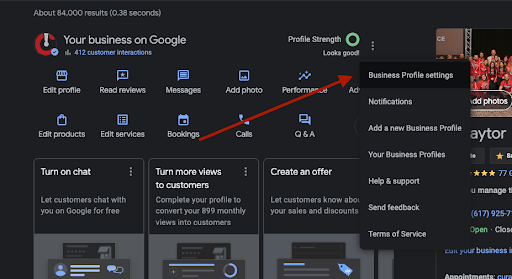
Step 2: Click the 3 dots and go to Business Profile Settings.
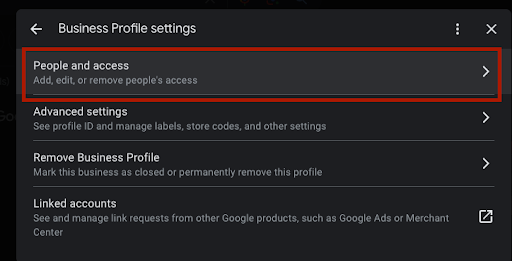
Step 3: Select "People and Access"
Step 4: Press Add.
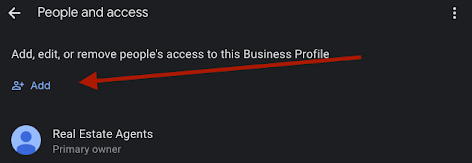
❗❗PRO TIP: If you do not see the Add button, you are not logged in as the owner.
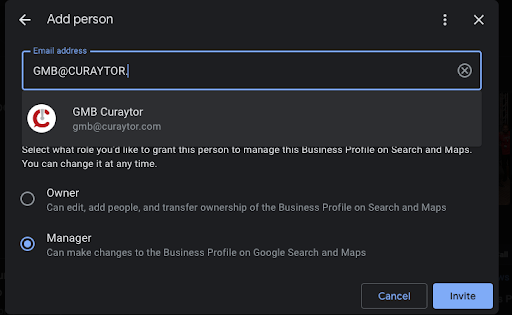
Step 5: Invite GMB@curaytor.com as a manager.
✨ If you run into any issues, please reach out to your Onboarding Specialist, your Curaytor Success Manager, or our support team at: support@curaytor.com