![Curaytor Logo horizontal - Color-Feb-12-2025-12-24-20-8194-AM.png]](https://help.curaytor.com/hs-fs/hubfs/Curaytor%20Logo%20horizontal%20-%20Color-Feb-12-2025-12-24-20-8194-AM.png?height=40&name=Curaytor%20Logo%20horizontal%20-%20Color-Feb-12-2025-12-24-20-8194-AM.png)
What is an LLMs.txt File?
Think of LLMs.txt as an AI-specific sitemap, or the robots.txt for the AI Era. While a robots.txt file tells search engines which pages they are allowed to crawl, an LLMs.txt file is a markdown file located in your site's root directory (e.g., yourwebsite.com/LLMs.txt) specifically designed to be read by Large Language Models (LLMs) like ChatGPT, Claude, and Gemini. It provides a compressed, high-context map of your website's most important information in a format that AI can digest instantly without hallucinating or getting lost in your site's code.
Why This Matters for Real Estate Agents
In a crowded market, you want AI models to recommend you when a user asks, "Who is the top luxury agent in [this area]?"
Here is how this file helps:
1. Accuracy and "Fact-Checking" for AI
It’s been well documented: AI models can "hallucinate” (see: straight up invent fake studies and lie) if they can't find clear data. By providing a clean LLMs.txt file, you are giving the AI a "cheat sheet" of your specific credentials, website content, active listings, and neighborhood expertise. It helps ensure that when an AI mentions you, it uses your correct phone number, current brokerage, and updated stats.
2. Priority Crawling & Context
Many websites are full of extra code to help design and performance with humans that AI crawlers have to filter out. An LLMs.txt file strips all of that away, offering a clean markdown version of your best content. This makes it significantly cheaper and faster for AI models to index your site, increasing the likelihood that your latest blog post or market report is included in their knowledge base.
3. Boosting "Answer Engine" Visibility
When a user asks a tool like Perplexity or ChatGPT a question, the AI looks for the most authoritative and easily readable source. Because your LLMs.txt file highlights your unique local insights, the AI is more likely to cite your website as the primary source for its answer, driving high-intent traffic back to you.
4. Defining Your "Entity"
In 2026, SEO is about being a recognized "Entity." Your LLMs.txt file explicitly defines the relationship between your name, your brand, and your specific geographic farm area. This reinforces your authority in the eyes of the algorithms, making you the "go-to" expert for your specific niche.
How to Update Your LLMs.txt File:
We've already built you an LLMs.txt file and added it to your website. You can see what's included by going to yoururl.com/llms.txt
If you see something there you'd like to replace, our best recommendation is to copy what's there, paste it into a word processor, and edit from there. Then, you'll want to paste your updated file into your LLMs.txt field.
To find it, log into your Curaytor platform.
Then click on the picture of your logo or headshot in your sidebar, in the bottom left corner of your browser.
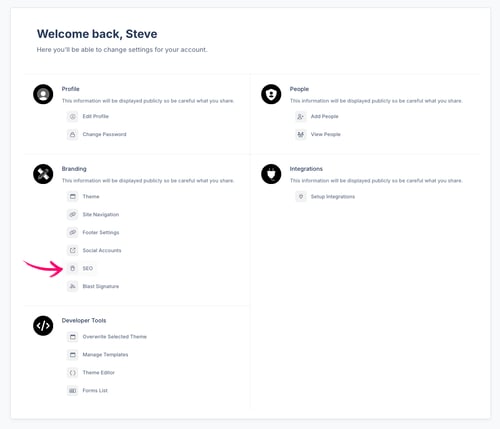
Click settings.
Here's where the experience branches a bit depending on which Curaytor website platform you're on, but they're pretty similar.
For clients on our V1 platform:
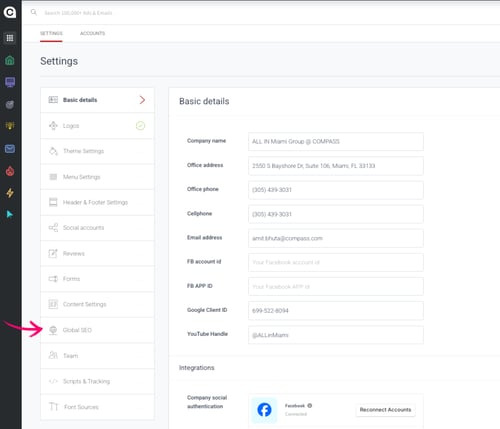
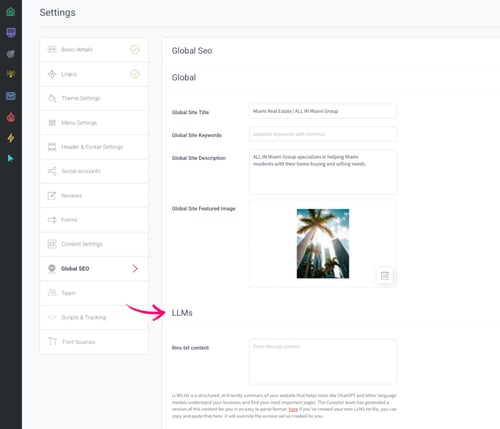
In the settings sidebar, click Global SEO.
Both platforms:
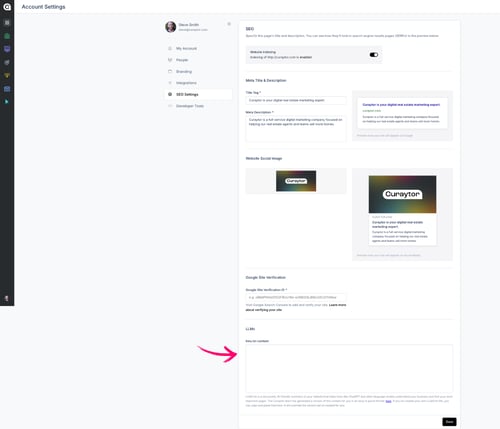
On this page, you'll see the LLMs.txt field with the following message.
LLMS.txt is a structured, AI-friendly summary of your website that helps tools like ChatGPT and other language models understand your business and find your most important pages. The Curaytor team has generated a version of this content for you in an easy to parse format: here. If you’ve created your own LLMS.txt file, you can copy and paste that here. It will override the version we’ve created for you.
Paste your updated file into the LLMs.txt field and click "Save."